

Current Status

The finance team manually creates the P&L projection model every time
It often takes 2 to 14 days to build Excel models—an error-prone process that lowers confidence in projections.





Excel-based P&L forecasting: Upload your template and get the finished model in your inbox.
Pro-grade template with auto-applied assumptions & scenarios — cut manual modeling time by 95%+.
Please proceed in the order 1️⃣2️⃣3️⃣4️⃣.
📌 We delete all uploads within 72 hours to protect your data.
✅ CFOs / Finance Officers: When a reusable profit and loss projection template is required for practical use
✅ Strategy / Business Development / Business Units: When analyzing annual P&L scenarios linked to strategic plans
✅ Startups: When preparing profit and loss forecasts to present to investors
✅ Accounting Firms / Consultants: When a standardized profit and loss model is needed without manual setup
✅ Investors: When a structured model is needed to evaluate a portfolio company’s profitability outlook
👉 Ready for immediate use—delivered as an Excel file for convenience.
 Maunal : Youtube https://www.youtube.com/@xDCFxPJT
The finance team manually creates the P&L projection model every time
It often takes 2 to 14 days to build Excel models—an error-prone process that lowers confidence in projections.

Custom P&L projection models automatically generated in Excel from your financial statements.
Smarter planningReliable and effortless — reducing errors, time, and cost
Same familiar Excel format — fully editable and customizable.
All processes and outputs are formula-driven in Excel, automatically updating with any changes to input.
Built-in CHOOSE functions and dropdown selections make scenario analysis easy and intuitive.
Compatible with all fiscal year-ends and reference months (January to December).
Simply fill in the pink cells in the Excel file to complete the projections with ease.
Linked to projected economic indicators for use in estimation.
Preparation of projected income statement.
Enables long-term forecasting (up to 30 years into the future).
Designed for easy copy-paste directly into reports.
Easily switch between USD and million USD.
Enter Basic Information :
Set the evaluation period by specifying the reference month, final forecast year, and fiscal year-end.
Enter Income Statement (PL) Data (Example)
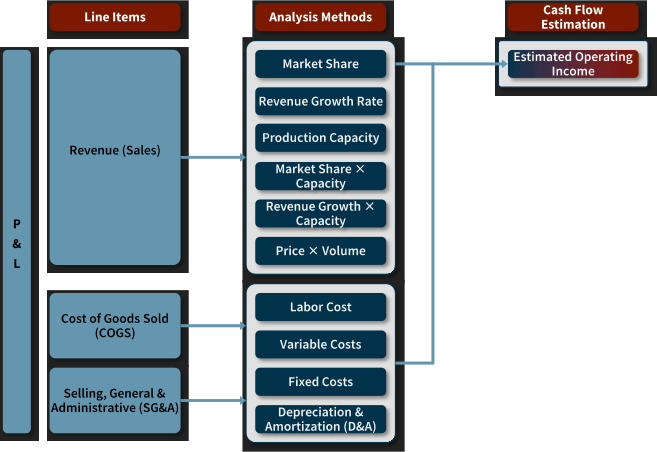
Structure the target analysis items as shown below and fill them into the template accordingly.
Patent application filed for the related computer-program implementation method and system [Application No. 10-2025-0003214]